
Handheld barcode scanners are widely used in businesses to scan product codes, record information, and manage daily operations. They help employees capture product details quickly without entering data manually. This makes work easier and reduces the chances of data entry errors.
These scanners are commonly used in warehouses, retail stores, manufacturing units, logistics, and healthcare facilities. Businesses can use them to track inventory, manage stock, process orders, and monitor product movement.
Today, handheld barcode scanners are available in different models with features such as wireless connectivity, fast scanning, and support for 1D and 2D barcodes. Brands like Zebra also offer reliable scanning devices for businesses that need accurate barcode reading in demanding work environments.
This guide explains how handheld barcode scanners work, their industry applications, important features, and how they connect with business software.
What Is a Handheld Barcode Scanner?
A handheld barcode scanner is a portable electronic device used to read barcode information from products, packages, and labels. It captures the data stored in a barcode and converts it into digital information that can be sent to a computer, mobile device, or business software.
These scanners use laser or image-based technology to read barcodes. They are available in wired and wireless models and can scan both 1D and 2D barcodes, depending on the device.
Businesses use handheld barcode scanners to manage inventory, track products, process orders, and record stock information. They reduce manual data entry and help employees complete daily tasks more quickly and accurately.
Working Process of Handheld Barcode Scanners
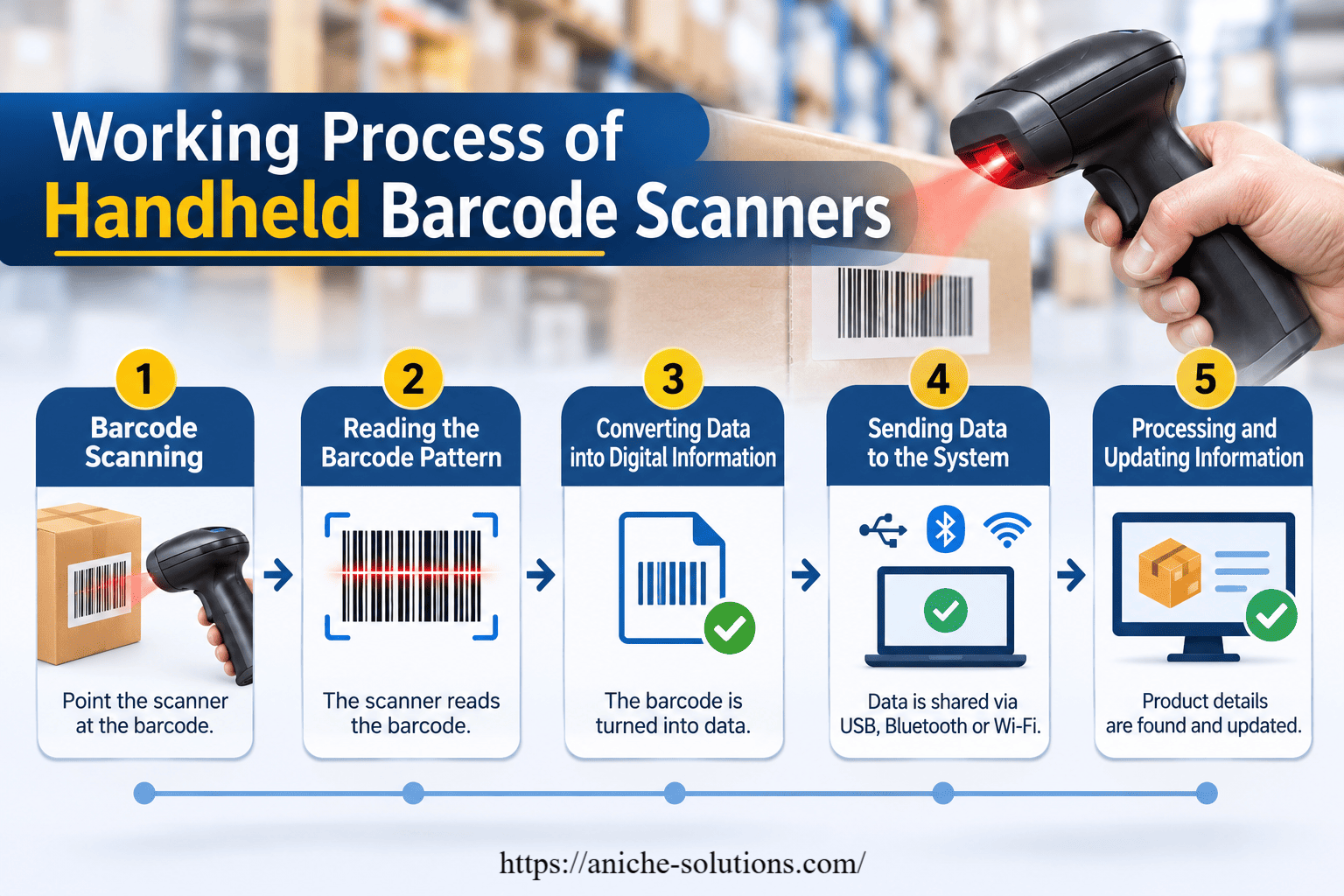
A handheld barcode scanner works by reading the pattern of lines or squares printed on a barcode and converting it into digital information. The scanner then sends this information to a connected system, where the product details are identified and recorded.
The working process involves the following steps:
Barcode Scanning
The user points the handheld scanner towards the barcode printed on a product, package, or label. The scanner captures the barcode using laser technology or an image sensor, depending on its scanning type.
Reading the Barcode Pattern
The scanner reads the black and white lines of a 1D barcode or the patterns of a 2D barcode. It identifies the differences in light and dark areas to capture the encoded information.
Converting Data into Digital Information
After capturing the barcode, the scanner's internal decoder converts the barcode pattern into readable data, such as a product code, serial number, or item ID.
Sending Data to the Connected System
The scanner transfers the decoded information to a computer, POS terminal, tablet, or mobile device. This connection can be established through a USB cable, Bluetooth, or Wi-Fi, depending on the scanner model.
Processing and Updating Information
The connected business software uses the scanned code to find the matching product record in its database. Based on the operation, it can update stock quantities, confirm product details, record sales, or update order status.
Handheld Scanner Applications Across Different Industries
Handheld barcode scanners are used across different industries to scan products, track inventory, and manage daily business activities. Their applications vary depending on the type of work and business requirements.
Warehousing and Logistics
Warehouses use handheld barcode scanners to track incoming and outgoing goods, manage stock, and verify orders. Employees can scan product labels during receiving, picking, packing, and dispatch to maintain accurate inventory records.
Retail Stores
Retail businesses use handheld scanners for product billing, price checking, stock verification, and inventory updates. These devices help cashiers process customer purchases quickly and allow store staff to check product availability.
Manufacturing
Manufacturing units use barcode scanners to track raw materials, work-in-progress items, and finished products. Employees can scan product labels at different production stages to maintain records and monitor product movement.
Healthcare
Hospitals and healthcare facilities use handheld barcode scanners to identify medicines, patient records, medical equipment, and laboratory samples. Scanning helps staff verify information and reduce identification errors.
Automotive Industry
Automotive businesses use barcode scanners to track spare parts, components, and finished vehicles. They help employees manage parts inventory, verify shipments, and maintain records during production and distribution.
Key Features to Look for in a Handheld Scanner
The right handheld scanner should match your business needs, scanning environment, and daily workload. Here are some important features to consider before selecting a device.
Scanning Performance
Choose a scanner that can read barcodes quickly and accurately. It should support the barcode types used in your business, including 1D and 2D barcodes.
Wired or Wireless Connectivity
Check whether you need a wired scanner or a wireless model. USB scanners are suitable for fixed workstations, while Bluetooth and Wi-Fi scanners offer more flexibility for warehouse and retail operations.
Durability
For industrial environments, choose a scanner with a strong body that can handle regular use, accidental drops, dust, and other workplace conditions.
Battery Life
Wireless scanners should have enough battery capacity to support long working hours. A good battery helps employees complete their tasks without frequent charging interruptions.
Scanning Range
Consider the distance from which the scanner needs to read barcodes. Some models are designed for close-range scanning, while advanced scanners can read barcodes from longer distances.
Software Compatibility
Check whether the scanner can connect easily with your existing POS, ERP, or warehouse management system (WMS). This helps maintain a smooth flow of information between devices and business software.
Ergonomic Design
A lightweight scanner with a comfortable grip is easier to handle during long working hours. This is especially important for employees who scan hundreds of products every day.
How Handheld Scanners Connect with Business Software
Handheld barcode scanners connect with business software to transfer scanned product information and update records. Depending on the scanner model, this connection can be established through USB, Bluetooth, or Wi-Fi.
Businesses can integrate handheld scanners with different software systems, such as:
Inventory Management Software
Scanners send product codes to inventory software to update stock quantities, record goods received, and track outgoing items.
Warehouse Management System (WMS)
In warehouses, scanners connect with WMS to manage receiving, picking, packing, order verification, and dispatch activities.
Enterprise Resource Planning (ERP)
ERP integration allows scanned information to reach different business departments. It helps maintain product, purchase, sales, and inventory records in one system.
Point of Sale (POS) Software
Retail stores connect barcode scanners with POS systems to identify products, retrieve prices, and process customer bills.
Asset Management Software
Businesses use scanners with asset management systems to identify equipment, record asset details, and track the movement of company assets.
FAQ
1. Can handheld barcode scanners read QR codes?
Yes, 2D handheld barcode scanners can read QR codes along with traditional 1D barcodes. Check the scanner specifications before purchasing.
2. Are Zebra handheld barcode scanners suitable for warehouse use?
Yes, Zebra handheld barcode scanners include models designed for warehouse operations. They offer features such as fast scanning, wireless connectivity, and rugged designs, depending on the model.
3. Can handheld barcode scanners connect with inventory management software?
Yes, compatible handheld scanners can connect with inventory management software to record product details, update stock levels, and track inventory movement.
Conclusion
Handheld barcode scanners help businesses manage inventory, track products, and process daily operations with greater speed and accuracy. Their use across industries such as retail, warehousing, manufacturing, and healthcare makes them an important tool for modern business operations.
Before selecting a scanner, businesses should consider scanning performance, connectivity, durability, battery life, and software compatibility. Choosing the right device helps reduce manual work and keeps business processes running smoothly.
For businesses looking for reliable scanning solutions, Zebra handheld barcode scanners offer different models to meet retail, warehouse, and industrial requirements. The right choice depends on your working environment and scanning needs.