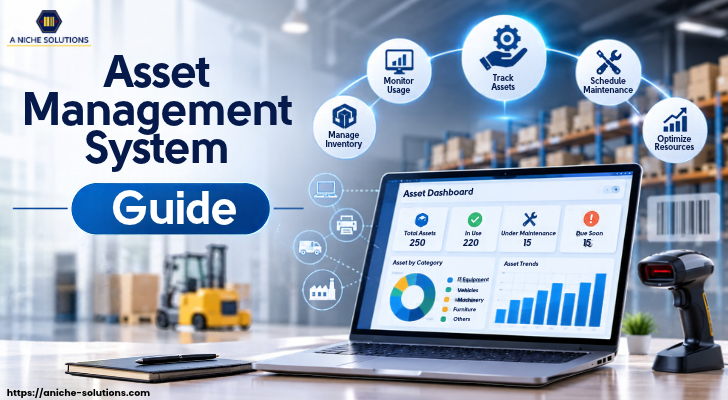
Every business depends on physical assets such as computers, machinery, vehicles, tools, and office equipment to run its daily operations. As a company grows, managing these assets becomes more challenging. Businesses may face problems like misplaced equipment, outdated records, unexpected repair costs, and poor asset tracking.
An asset management system provides a simple way to manage all business assets from one place. It helps companies record asset details, track their location, monitor usage, and keep maintenance schedules updated. This gives teams better control over the assets they use every day.
An asset management system software also helps businesses maintain accurate records and reduce manual work. From tracking individual equipment to managing large asset inventories, it supports better planning, reduces unnecessary expenses, and helps businesses use their resources properly.
What Is an Asset Management System?
An asset management system is a software solution that helps businesses manage, track, and maintain their physical assets throughout their life cycle. These assets can include computers, machinery, vehicles, tools, furniture, and other equipment used in daily operations.
The system stores important asset details in one place, such as purchase date, cost, location, condition, maintenance history, and assigned employee. This makes it easier for businesses to check where an asset is located, who is using it, and whether it needs repair or replacement.
An asset management system also helps businesses maintain accurate records and avoid common problems like lost equipment, duplicate purchases, and missed maintenance schedules. It gives managers a clear view of their available assets and helps them make better decisions about asset usage and costs.
How Does an Asset Management System Work?
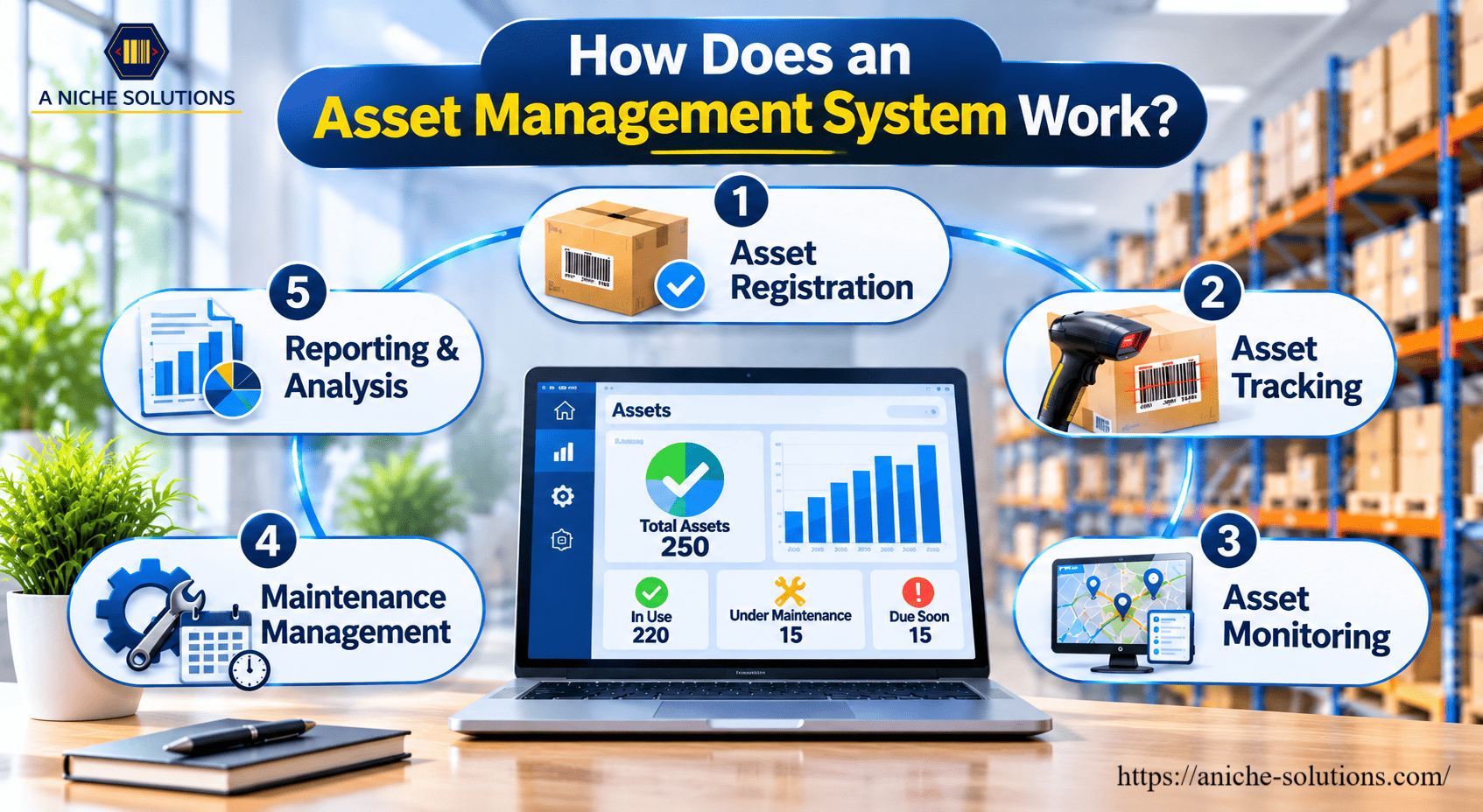
An asset management system works by recording asset details, tracking their movement, and monitoring their condition from one central platform. The process generally involves the following steps:
1. Asset Registration
Each asset is added to the system with details such as its name, serial number, purchase date, cost, and location. Businesses can also assign a unique barcode or RFID tag to each asset for easy identification.
2. Asset Tracking
The system helps employees track where assets are located and who is using them. Barcode scanners, RFID readers, or mobile devices can be used to update asset information and record movement between departments or locations.
3. Asset Monitoring
Asset details are updated regularly to keep records accurate. Managers can check the condition, usage, and availability of equipment. This helps them identify assets that are underused, damaged, or require attention.
4. Maintenance Management
The software helps businesses schedule regular maintenance and record repair activities. It can also send reminders for upcoming maintenance, reducing the chances of unexpected equipment breakdowns.
5. Reporting and Analysis
The system creates reports about asset availability, maintenance costs, usage, and overall performance. Managers can use this information to plan purchases, control expenses, and make better decisions.
Different Types of Asset Management Systems
Businesses manage different types of assets depending on their size, industry, and daily requirements. An asset management system can be designed for different purposes. Here are some common types used by businesses.
IT Asset Management System
An IT asset management system helps businesses manage computers, laptops, servers, printers, software, and other IT equipment. It keeps records of hardware, software licences, purchase details, and maintenance activities. This helps IT teams track their resources and avoid unnecessary purchases.
Fixed Asset Management System
A fixed asset management system is used to manage long-term business assets such as buildings, furniture, machinery, and vehicles. It helps maintain purchase records, depreciation details, asset value, and disposal information. Businesses can use it to keep financial records accurate.
Asset Inventory Management System
An asset inventory management system helps businesses maintain records of all their available assets. It provides information about asset quantity, location, condition, and availability. Barcode and RFID technologies can also be used to identify and track assets quickly.
Enterprise Asset Management System (EAM)
An enterprise asset management system helps large businesses manage assets across multiple departments and locations. It covers asset maintenance, work orders, equipment performance, and operational costs. Manufacturing plants, utilities, and large industrial companies often use this system.
Asset Integrity Management System
An asset integrity management system focuses on keeping industrial equipment, machinery, and infrastructure safe and reliable throughout their working life. It helps businesses monitor equipment conditions, identify potential risks, plan inspections, and prevent unexpected failures.
Digital Asset Management System
A digital asset management system is used to store, organize, and manage digital files such as images, videos, documents, graphics, and marketing materials. It allows teams to access, share, and manage digital content from a central location.
Key Benefits of an Asset Management System
Managing business assets manually can take a lot of time and may lead to errors. An asset management system helps businesses keep records organized, track equipment, and manage maintenance activities from one place. Here are some key benefits of using this system.
Better Asset Tracking
Businesses can track the location, condition, and availability of their assets in real time or through regular record updates. This makes it easier to find equipment and know which employee or department is using it.
Reduced Operating Costs
An asset management system helps businesses avoid unnecessary purchases, reduce equipment loss, and manage repair expenses. Regular maintenance also helps prevent costly breakdowns and extends asset life.
Improved Asset Utilization
The system gives managers a clear view of how assets are being used. They can identify unused or underused equipment and assign it where it is needed. This helps businesses get better value from their existing resources.
Easy Maintenance Management
Businesses can schedule maintenance, record repairs, and receive reminders for upcoming service dates. Regular maintenance keeps equipment in good condition and reduces unexpected downtime.
Accurate Record Keeping
All important asset details are stored in one central system. Employees can check purchase information, asset location, warranty details, and maintenance history without searching through multiple files or spreadsheets.
Industries That Use Asset Tracking Systems
Asset tracking systems are useful for businesses that manage equipment, machinery, tools, vehicles, or other valuable resources. Here are some industries where asset tracking systems play an important role.
Manufacturing Industry
Manufacturing companies use asset tracking systems to monitor machinery, production equipment, tools, and other factory assets. The system helps track equipment usage, schedule maintenance, and reduce downtime that can affect production.
Healthcare Industry
Hospitals and healthcare centres use asset tracking to manage medical equipment such as wheelchairs, patient monitors, infusion pumps, and diagnostic machines. It helps staff locate equipment quickly and check its availability when needed.
IT and Technology Industry
IT companies use asset tracking systems to manage laptops, computers, servers, networking devices, and other technical equipment. These systems help track assigned devices, monitor their locations, and maintain records of repairs and replacements.
Retail Industry
Retail businesses use asset tracking to manage store equipment, billing machines, computers, display units, and other resources. It helps companies maintain asset records across multiple stores and track equipment transfers between locations.
Construction Industry
Construction companies manage heavy machinery, tools, vehicles, and safety equipment across different project sites. Asset tracking systems help them monitor equipment locations, check availability, and reduce the risk of loss or misuse.
Logistics and Transportation Industry
Logistics companies use asset tracking systems to manage delivery vehicles, trailers, containers, and handling equipment. These systems help track asset movement, monitor availability, and maintain records across warehouses and transportation routes.
Education Industry
Schools, colleges, and universities use asset tracking to manage computers, laboratory equipment, furniture, projectors, and library resources. It helps administrative teams maintain accurate records and keep track of equipment assigned to different departments.
Essential Features of Asset Inventory Management Software
Asset inventory management software includes different tools that help businesses manage asset information and daily inventory activities. These features make it easier to identify assets, maintain records, and connect physical equipment with digital information.
Barcode and QR Code Scanning
The software should support barcode and QR code scanning to identify individual assets. Each asset can have a unique code linked to its digital record. Employees can scan the code using a mobile device or scanner to access asset details.
RFID Integration
RFID integration allows businesses to identify assets using radio frequency technology. RFID tags attached to equipment can communicate with RFID readers without requiring direct scanning. This feature is useful for businesses managing a large number of assets across warehouses, factories, and multiple locations.
Mobile Application Support
Mobile access allows employees to use asset management software through smartphones or tablets. They can scan asset labels, view equipment details, update records, and perform physical asset verification directly from their devices.
Custom Fields and Asset Categorization
Businesses often manage different types of equipment with different information requirements. Custom fields allow users to add details such as model number, manufacturer, warranty period, department, and asset category according to their needs.
Cloud-Based Data Access
Cloud-based software allows authorized users to access asset information from different locations through an internet connection. It also supports centralized data storage and access across multiple business branches.
Why Is Asset Management Essential for Today's Businesses?
As businesses grow, managing equipment, machinery, tools, and other resources becomes more challenging. Manual records and spreadsheets may not be enough to handle a large number of assets across different departments or locations. An asset management system provides a central platform where businesses can maintain asset information and keep their records organized.
Modern businesses also need accurate information about asset usage, maintenance, ownership, and condition. A proper system helps teams keep these details updated and makes it easier to manage asset-related activities. It also supports regular inspections, maintenance planning, and compliance with industry requirements.
An asset management system software is useful for businesses that want better control over their physical resources. It helps companies manage growing asset inventories, maintain clear records, and handle daily operations in a more structured way. This makes asset management an important part of long-term business planning.
How to Select the Best Asset Management System
A system that matches your daily business operations will be easier for employees to use and manage. Here are some important factors to consider when selecting an asset management system:
Understand Your Business Requirements
Start by identifying what your business needs from the software. Check whether you need to manage IT equipment, machinery, vehicles, tools, or different types of assets. This will help you choose a system with the right functions.
Check Tracking Technology Support
Look for software that supports barcode, QR code, and RFID technologies. These options help businesses identify assets and record their movement. Choose the technology based on the number of assets and your tracking requirements.
Look for Easy Integration
The software should work with your existing ERP, inventory, accounting, or other business applications. Proper integration helps maintain consistent information across different platforms.
Consider Scalability
Choose a system that can support your business as it grows. It should allow you to add more assets, users, departments, and locations without requiring a complete software change.
Check Reporting and Customization Options
The system should provide useful reports and allow businesses to customize asset categories, fields, and records. These options help match the software to specific operational requirements.
Evaluate Support and Implementation
Check whether the software provider offers installation, employee training, technical support, and regular updates. Proper implementation support makes it easier for your team to start using the system.
Why Choose A’ Niche Solutions for Your Business?
A’ Niche Solutions provides technology solutions that help businesses manage their inventory, assets, and warehouse operations. Its solutions include barcode, RFID, NFC, and IoT technologies that support accurate identification and tracking of business resources.
With solutions such as asset management, inventory management, and warehouse management systems, A’ Niche Solutions helps businesses connect their physical operations with digital systems. Its solutions can also be integrated with existing ERP platforms such as SAP HANA, Oracle, and customized ERP systems to match different business requirements.
A’ Niche Solutions focuses on providing practical solutions based on business needs, along with implementation and technical support. Whether a business wants to manage equipment, track assets across multiple locations, or improve inventory visibility, A’ Niche Solutions offers technology options to support its operational requirements.
FAQ
1. How do barcode and RFID technologies help in asset tracking?
Barcodes use scanned codes to identify assets, while RFID uses radio waves to identify tagged assets through readers.
2. What is an asset integrity management system?
It helps businesses monitor the safety, condition, and reliability of industrial equipment and infrastructure.
3. Can an asset management system integrate with ERP software?
Yes, many asset management systems support ERP integration to share asset information with other business applications.
4. What is the purpose of asset audits?
Asset audits help businesses verify physical assets against recorded information and identify missing, damaged, or incorrectly recorded items.
Conclusion
An asset management system helps businesses maintain accurate asset records, track equipment, and manage maintenance activities from one place. With features such as barcode scanning, RFID integration, and digital asset records, companies can manage their resources more efficiently.
The right asset management system software depends on business requirements, asset types, and operational needs. A’ Niche Solutions provides barcode, RFID, and asset management solutions that help businesses manage their assets and improve control over daily operations.